
This article is applicable for the Linux Reseller Hosting which comes with WHM
1) Login to WHM (http://domainname/whm)
2) Proceed to the Search panel which is placed on the top left corner and type in "edit dns" and click on Edit DNS Zone below the DNS Functions

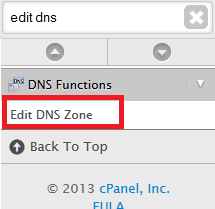
3) Choose the domain name that you wish to edit under the "Choose a Zone to Edit" and click on Edit
4) Edit the records as below :
mail IN CNAME --> ghs.googlehosted.com.
domain.com IN MX --> 1 (priority) aspmx.l.google.com.
domain.com IN MX --> 5 (priority) alt1.aspmx.l.google.com.
domain.com IN MX --> 5 (priority) alt2.aspmx.l.google.com.
domain.com IN MX --> 10 (priority) alt3.aspmx.l.google.com.
domain.com IN MX --> 10 (priority) alt4.aspmx.l.google.com.
domain.com IN TXT --> v=spf1 include:_spf.google.com ~all

5) Finally for the Email Routing, please select "Remote Mail Exchanger" instead of Local Mail Exchanger
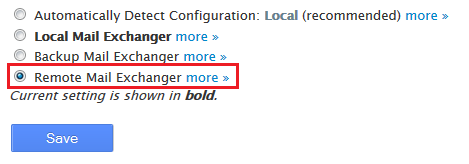
6) Final step will be in Saving the changes.